Html Semantics
HTML semantics refers to the tags that provide meaning to an HTML page rather than just presentation. It makes HTML more comprehensible by better defining the different sections and layout of web pages.
HTML semantics are used for the following reasons:
The pages made with semantic elements are much easier to read.
It has greater accessiblity.It offers a better user experience.
A semantic element describes meaning to the browser and the developer.
Examples of non-semantic elements:<div> and <span>-Tells nothing about its content. Instead of using div tags in your HTML page, HTML semantics should be used.
HTML semantic elements are as follows:
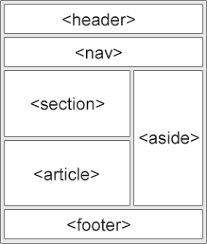
<header>: The header of the page. Headers often contain the organization’s name and logo, primary navigation, a search bar, a sign-in prompt, and/or a shopping cart icon.
<footer>: The footer of the page. Footers often contain additional information like an address, a contact form, and/or legal information.
<main>: Contains the main content of a page. This is the content that is unique to the specific page, and where visitors will probably spend most of their time.
<nav>: The site navigation. This tag usually contains a list of links to different parts of the website.
<aside>: Contains related content that doesn’t belong with the main content but is still related to it — this might be a related posts list or a sidebar containing display ads.
<article>: A standalone piece of content, like a blog post or a news article.
<section>: A section of a longer text piece. For example, you could assign a different <section> to different h2s of a blog post.
Other Semantic HTML Tags
## **Using Semantic Tags Correctly**
When using semantic tags to convey meaning rather than for presentation purposes, be careful that you don't use them incorrectly simply for their common display properties. Some of the most commonly misused semantic tags include:
* **blockquote** — Some people use the [<blockquote>](https://www.thoughtco.com/what-is-a-blockquote-3468272) tag for indenting text that is not a quotation. This is because blockquotes are indented by default. If you simply want to indent text that's not a blockquote, use CSS margins instead.
* **p** — Some web editors use <p> </p> (a non-breaking space contained in a paragraph) to add extra space between page elements, rather than defining actual paragraphs for the text of that page. As in the previous example, you should use the margin or padding style property instead to add space.
* **ul** — As with <blockquote>, enclosing text inside a <ul> tag indents that text in most browsers. This is both semantically incorrect and invalid HTML, because only <li> tags are valid within a <ul> tag. Again, use the margin or padding style to indent text.
* **h1, h2, h3, h4, h5, and h6** — You can use heading tags to make fonts bigger and bolder, but if the text is not a heading, use the font-weight and font-size CSS properties instead.
By using HTML tags that have meaning, you create pages that impart more information than those that simply surround everything with <div> tags.
I hope this article encourages you to use HTML semantics more.
